


Category
Supplier ManagementDate Posted
July 14, 2026Buying teams faces a major shift in how they work today. Using a supplier portal creates a clear 44.4% drop in the time it takes to finish the PR-to-Award cycle. This guide shows what a portal does and how it makes your daily tasks much simpler.
Introduction
Workload expectations for procurement teams will grow exponentially in 2026. Relying on scattered emails and basic spreadsheets makes your daily routine much harder than it needs to be. A supplier portal brings your communication and files into one secure place automatically.
This is no longer just a nice idea for buying teams. Moving to a dedicated digital space is a must if you want to stay in control and get the most value out of your vendor relationships without adding more headcount.
What Is a Supplier Portal
A supplier portal is a secure online platform built to connect buying teams directly with their vendors. Also referred to as a vendor portal or a vendor management portal.
A Central Hub
The Shift to Self Service
They can submit their invoices directly into your system and check on open purchase orders at any time. The platform also lets vendors upload their own tax documents and change their bank details without asking your team for help.
This self-service setup takes a massive amount of busy work off your plate. Your procurement team gets room to breathe. When you stop doing manual data entry, your whole department runs much better, and you can focus on building stronger partnerships.
Supplier Portal vs Vendor Management System
Knowing the difference between these two software tools is highly important when you are building your tech stack. They do very different things but they work together perfectly.
The Daily Tactical Workspace
A supplier portal is all about the daily, practical work. It is the place where invoices are sent, purchase orders are accepted and daily chats happen. It handles the fast, immediate steps of buying goods and services.
The Strategic Command Center
A vendor management system is built for the long game. It holds your big, multi-year contracts and tracks how well your vendors are doing over time. It helps you manage risk and score your suppliers based on their long-term performance.
Bridging the Gap
Think of the portal as your daily workbench and the vendor management system as your long-term planning room. Using intelligent supplier management software helps you link these daily tasks directly to your big-picture goals. You really need both to handle the growing amount of work and new rules in the market today.
How Does a Supplier Portal Work
The steps inside a self-service supplier portal are highly logical and built to save you time. It walks your vendors through a clear path from their very first day.
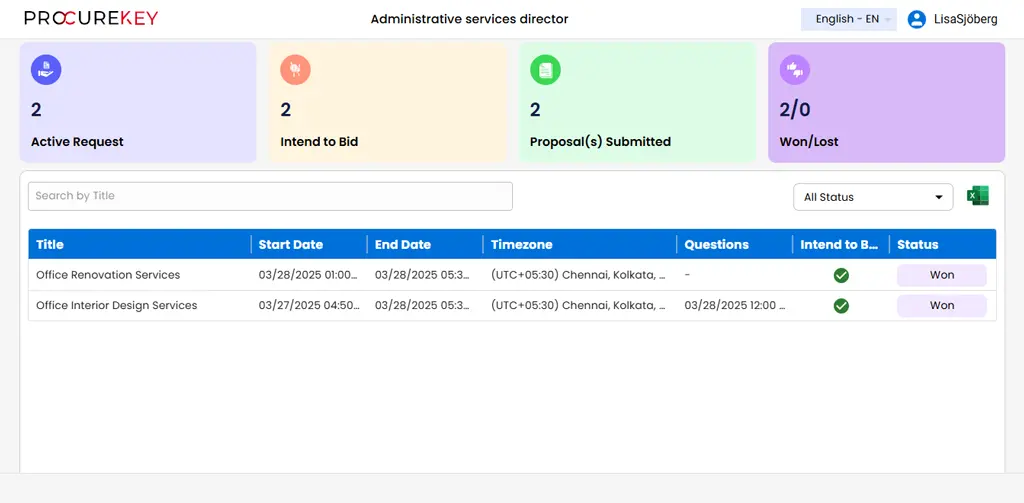
1. Supplier Registration
It starts with registering the vendor. Your new supplier gets an email invite to create a secure login. They fill out their own company details and add their tax information. Doing this digitally cuts the setup by 50% compared to manual forms.
2. Order Acceptance
This brings the waiting period down to a few days. Once your team approves their profile, the vendor logs in to see their active RFPs. They can intent to bid and start working on your request right away.
3. Invoice Matching and Payment
When the work is done, the supplier uploads their invoice directly into the AP vendor portal. The software looks at the invoice and checks it against the original purchase order and the delivery receipt automatically. Doing this by hand is too slow for modern buying teams.
If all the numbers match perfectly, the invoice moves to the final approval stage. Your finance team releases the payment based on your terms. The vendor can watch this payment status in real time so they never have to call you to ask where their money is.
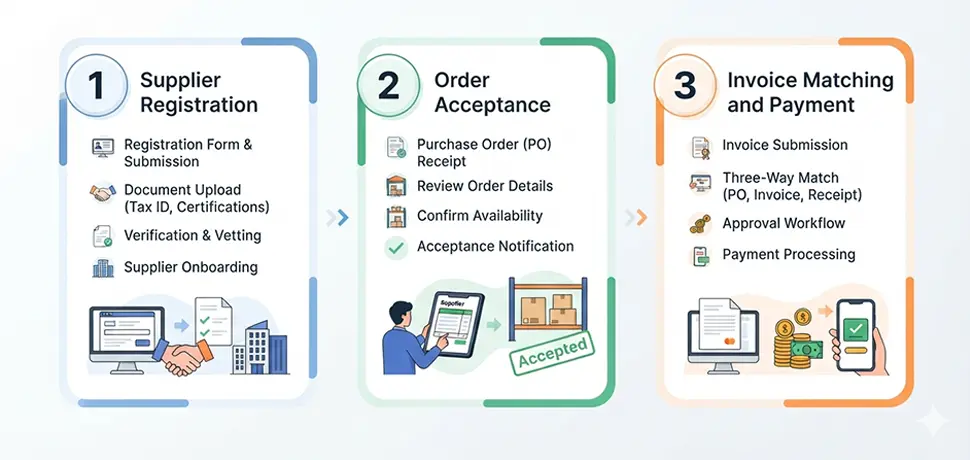
Cut your onboarding time in half and process invoices instantly with automated matching workflows.
Key Features of a Supplier Portal
Good software comes with specific tools designed to fix the exact problems you face every day. These supplier portal features turn a basic file-sharing tool into a powerful workstation. You need to know what these features are so you can get the best results for your team.
Invoice and PO Tracking
Suppliers always want to know when they are getting paid. This tool lets them check the exact status of their invoices and purchase orders whenever they want. It stops them from sending you endless emails asking for updates.
They have total clarity on their payment dates. This builds trust between your companies and frees your finance team from acting like a help desk.
Document Management
Your department handles a huge amount of important paperwork. The portal acts as a locked, highly secure digital filing cabinet for your contracts and insurance forms. It ensures that everyone is always looking at the newest version of a document.
This stops mistakes before they happen and keeps your legal risks very low. Having a secure place for files is highly important as business rules get stricter.
Automated Workflows
Passing documents around by hand or through email causes huge delays. Automated workflows send approvals to the exact right person based on rules you set up. If an invoice is over ten thousand dollars, the system sends it straight to your director.
This keeps the work moving fast and stops files from sitting on a desk for weeks. These smart rules make your entire buying cycle much shorter and far more reliable.
Compliance Monitoring
Rules and regulations are getting tougher to track on your own. The system watches your vendors' important documents and knows exactly when a certification is about to expire. It sends an alert to the vendor telling them to upload a new file.
This smart tracking protects your company from paying large fines. Keeping up with rules is a top reason why leaders buy new software today.
Supplier Onboarding Portal
Bringing a new vendor on board takes a lot of data collection. A supplier onboarding portal turns that long paper questionnaire into a simple web form. Suppliers type in their own details and attach their own files.
This gets them ready to work much faster and ensures their data is completely accurate. Forcing your team to type this data by hand is a massive waste of time.
Performance Scorecards
ERP Integration
If your portal does not talk to your main accounting software, you will end up typing the same numbers twice. A direct connection to your ERP system is an absolute must. Information needs to flow smoothly between the portal and your finance records.
This keeps your entire company on the same page and makes your reports highly accurate. Linking these systems together gives you a clear view of where your money is going.
Contextual Messaging
Long email chains make it easy to lose important details about an order. Built-in chat lets buyers and suppliers talk directly on the actual purchase order page. This creates a permanent record of everything that was said and agreed upon.
It solves arguments very quickly because you can see the exact history of the chat. Keeping communication in one place makes you look like a highly organized partner.
Gain total visibility into vendor performance and eliminate compliance risks with centralized digital tracking.
5 Benefits of Using a Supplier Portal
The way buying teams work is changing fast, and you need tools that bring real value to your day. The supplier portal benefits you get go way beyond just having fewer papers on your desk. Here are the main ways this technology makes your life better.
1. Massive Time Savings
Typing numbers from an invoice into your computer takes away hours of your week. A self-service portal makes the supplier do that work instead. Your team can stop answering the phone just to tell someone an invoice was received.
You can spend your time finding better deals and building stronger vendor networks. This directly helps close the 8.8% productivity gap that many teams are facing right now.
2. Significant Cost Savings
Handling paper invoices costs your company a lot of money and leads to lost files. Digital invoices are much cheaper to process and they never get lost in the mail. Moving faster also means you can ask for early payment discounts from your vendors.
Teams that use these portals have cut down their unapproved spending by 25%. Stopping that rogue spending keeps a lot more money in your company’s budget.
3. Better Supplier Relationships
Vendors want to work with buyers who are easy to deal with. Giving them a clear, simple software tool builds a lot of trust. When a supplier knows exactly when they are getting paid, they stop worrying and start working harder for you.
They turn into long-term partners instead of just companies that drop off boxes. Sharing data openly removes the stress from your daily phone calls.
4. Strengthened Compliance
Internal audits are a nightmare when your files are hidden in your email inbox. A shared portal stamps a date and time on every single action taken by you and the vendor. You can show your auditors exactly what happened in just a few clicks.
Tracking your supply chain’s carbon footprint is also much easier with this tool. The system collects the right safety and environmental data so you never have to worry about missing a rule.
5. A Single Source of Truth
Looking at two different sets of numbers causes arguments and slows down your workday. The portal makes sure that you and your supplier are looking at the exact same data at the same time. If there is a question about a price, you can fix it in minutes.
Being open and clear becomes the normal way you do business. Current reports show that only 63.9% of master data is accurate without a modern digital system in place.
Stop losing money to manual errors and rogue spending. Upgrade your daily buying operations.
Common Use Cases
Different types of companies use this software in their own ways to get work done faster. Seeing how other teams use the tool can help you figure out the best setup for your own office.
Finance and Accounts Payable
Global Manufacturing Supply Chains
Highly Regulated Industries
Growing Mid Market Teams

How to Choose Supplier Portal Software
Picking the right software partner takes careful thought and testing. This choice is too big to rush because it will change how your team works every single day.
Check for Long Term Growth
Test the System Connections
Demand Top Tier Security
Focus on Ease of Use
Finally, look closely at the pricing and how much you can change the setup. You want intelligent supplier management software that matches your approval rules perfectly. Stay away from companies that try to charge you extra fees every time you add a new supplier.
Common Mistakes When Implementing
Rolling out a big software change always comes with a few risks. Many teams do a great job buying the software but mess up when it is time to turn it on.
Failing to Talk to Vendors
Not talking to your vendors early is the biggest mistake you can make. If you do not explain how this new tool makes their life easier, they will not want to use it. You have to sell the idea to your suppliers with clear, helpful emails.
Skipping the Main System Link
Skipping the connection to your main ERP system is a terrible idea. If you do this, your staff will spend all day copying numbers from the portal into your finance software. That completely ruins the goal of buying the tool in the first place.
Forgetting to Train Your Team
Forgetting to train your own staff guarantees that the project will fail. Your buying team needs to know the software inside and out so they can help vendors who get stuck. Team training is absolutely critical for long term success.
Doing Too Much Too Fast
Trying to use every fancy feature on day one is highly risky. You need to focus only on getting your basic invoices and purchase orders working perfectly first. Do not turn on the complex tracking tools until the basic daily work is running smoothly.
Frequently Asked Questions
Conclusion
Changing the way your buying team works takes a bit of effort, but the payoff is huge. Putting a dedicated portal in place removes the daily stress and makes your department much stronger. When you bring your suppliers into a shared, easy-to-use digital space, you take full control of your workday. Connect with ProcureKey today to start making your buying process better.